
Pillow Chase Home App
Hadiz StudioPersonalization
4.4658.00 Reviews
- Version
- 2.1
- Installs
- 10.00M
- Age Rating
- Teen
Screenshots
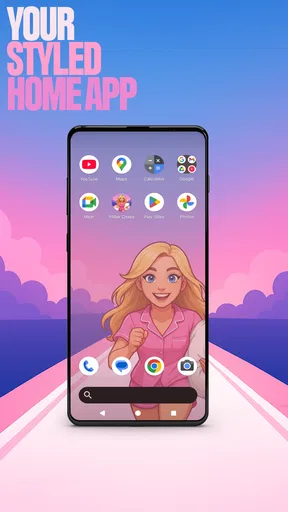

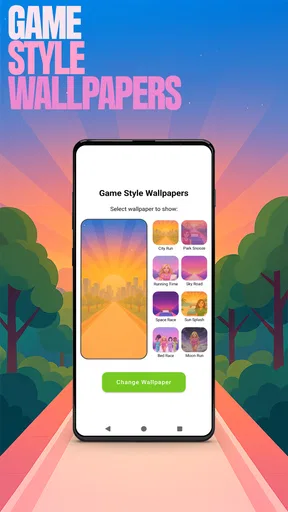
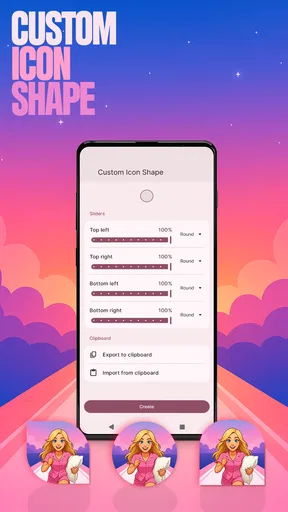
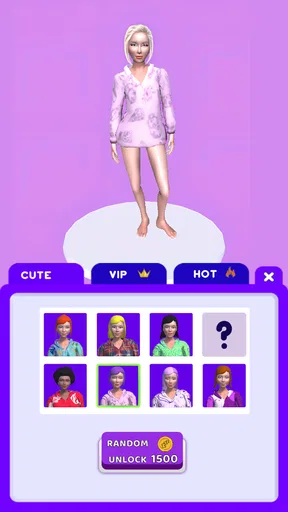
Our Review of Pillow Chase Home App
 Analysis by Appyee
I’d approach Pillow Chase Home App as a personalization app with a very specific identity, rather than assume its name tells the whole story. The name sounds playful, but what matters on a phone is whether the experience feels quick to understand, dependable in ordinary use, and comfortable to keep around. I’d be especially careful not to expect a full home-management system just from the wording: the confirmed store description is brief, so I would judge the app by what it actually offers after installing it, not by imagined functions.
What to expect from the first launch
When I try a new personalization app, I look for a clear first screen, simple choices, and a way to get to the main experience without a long setup. That is a useful standard for Pillow Chase Home App, too. The app is free, made by Hadiz Studio, and sits in the personalization category. Those details make it easy to try, but they don’t tell me how fast it opens or how much work it takes to make it feel right on my device.
My practical advice is to explore at a relaxed moment rather than while you’re in a hurry. Pay attention to how many steps separate opening the app from the thing you came to do, and whether the controls make sense without repeated guessing. A brief first session is also a better test than tapping through every option at once: it shows whether the app’s basic flow feels natural before you invest time in exploring further.
Speed matters most in the moments you return
For an app in this category, perceived speed is not only about the launch animation. I care more about whether it responds promptly when I return to it, move between its screens, or make a small change. These are the interactions that shape a daily impression. If they feel straightforward, I’m more likely to keep using the app; if each visit turns into a wait or a search, even an appealing idea can lose its charm.
I would also separate a slow moment from a persistent problem. A short pause during first use does not automatically mean the app will feel sluggish every time, while repeated delays during simple actions would be a more meaningful drawback. Try the same ordinary task more than once, ideally after closing and reopening the app. That gives you a more useful sense of consistency than a single first impression.
Busy sessions and reliability
Heavy use can reveal friction that a quick glance will miss. If you spend a longer session exploring the app, notice whether the screen remains responsive and whether you can pick up where you intended after switching briefly to another app. I wouldn’t assume that a particular background feature or recovery behavior exists; instead, I’d treat returning cleanly from interruptions as a practical test for any app I plan to keep close at hand.
There is a difference between an occasional hiccup and an experience that makes you repeat work. If the app seems to restart, loses your place, or becomes awkward after ordinary interruptions, that is worth weighing before relying on it as part of a routine. Conversely, if your use is brief and occasional, a small inconvenience may matter less than whether the app’s central experience is enjoyable and easy to reach.
Device fit and sensible expectations
The current version is 1.4, and the minimum supported operating system is Android 8.0. That gives Android users a clear compatibility check before installing. The app has a Teen content rating, so it is also sensible to keep that audience guidance in mind when deciding whether it suits a shared device or a younger user. Its 4.5 average from around 18,000 ratings and more than a million installs suggest that many people have tried it, though popularity alone cannot tell you how it will behave on your particular phone.
If your device is older or already short on storage or memory, I’d test the app before making it part of a regular routine. I would not infer its resource demands from its category or name. Instead, notice whether it remains comfortable to use alongside your usual apps and whether your phone continues to feel responsive. If you want a highly predictable, lightweight tool for a specific job, a simpler alternative may be a better fit than any app whose purpose does not immediately match your needs.
Getting Started with Pillow Chase Home App
The first thing that struck me about the Pillow Chase Home App was its user-friendly interface. Setting it up was as easy as pie. A few taps here and there, and I was ready to dive into a world of home organization. The app guides you through a quick setup process, asking you to input details about your home, like the number of rooms and specific areas you want to focus on. It's like having a personal home manager right in your pocket.
Features That Make It Stand Out
Now, let's talk features. One standout feature is the personalized organization plans. The app analyzes your input and provides customized tips and tasks to tackle your mess. I was particularly impressed by the cleaning schedule it generated for me. It broke down tasks into manageable chunks, making it much less overwhelming.
Another feature that deserves a shoutout is the app's ability to sync with smart home devices. Imagine controlling your smart vacuum or lights directly from the app while organizing your home. It's all about convenience and efficiency.
How It Fits Into Daily Life
So, how did it fit into my daily routine? Seamlessly! I can honestly say it’s like having a little helper that reminds you of what needs to be done and when. The daily reminders and notifications are subtle yet effective. It's like the app knows when you’re tempted to procrastinate and gives you that gentle nudge you need.
Moreover, the app includes a delightful feature where you can set up rewards after completing tasks. I mean, who doesn't love a little motivation in the form of a treat? It's these small touches that make the app feel personalized and engaging.
Who will get the most out of it
The app’s appeal depends on what you want from your phone. If you enjoy trying personalization apps and are open to a playful, themed experience, the free price makes a low-commitment trial reasonable. Its 4.5 average across around 18,000 ratings is encouraging context, not a promise that the style or behavior will suit everyone. I’d give it a short, deliberate test and decide based on the actual screens and interactions you encounter.
A realistic way to evaluate it is to open it during a quiet moment at home, explore the first few screens, then return later when you have only a minute. That second visit tells you more about everyday convenience than an uninterrupted tour. Ask yourself whether you can quickly find the part you liked, whether the visual style still feels pleasant, and whether the app earns space on your home screen rather than becoming something you forget after the first day.
On the other hand, I’d skip it if you are looking for a dependable utility with a clearly defined task and little room for interpretation. The name alone may set up expectations that don’t match what you find, and a personalization app is not automatically a home-organizing tool. If you need a practical system for chores, household reminders, or controlling connected equipment, choose an app that explicitly focuses on that need and verify its functions before building a routine around it.
How to judge it against alternatives
The usual alternatives in personalization are often simpler: a wallpaper or theme app may do one job directly, while a launcher can change broader parts of how you navigate your phone. I’d compare this app with those options by asking what kind of change you actually want. If you mainly want a quick visual refresh, a focused wallpaper tool is easier to evaluate. If you want to alter navigation and layout, a launcher is the more relevant comparison. Pillow Chase is worth considering only if its own presentation and experience are the part you want, rather than because its title suggests a different household function.
There is also a useful trade-off between novelty and familiarity. A themed app can make a phone feel less generic, but any distinct style may become tiring if you prefer a restrained interface. Before spending time personalizing around it, try the experience as-is and note whether it remains comfortable after repeated visits. That small check can save you from setting up a look you enjoy for five minutes but do not want to see every day.
Small checks that prevent frustration
I’d approach notifications cautiously. If the app offers reminders or alerts in your actual setup, enable only what seems useful at first, then decide whether each interruption is earning its place. A notification that helps you return to an app can be welcome; repeated prompts that do not match your routine can make you disable them altogether. Starting selectively makes it easier to tell whether the app is helping or simply adding noise.
For a shared phone, take a moment to consider who else uses the device and whether the app’s Teen content rating is appropriate for them. That is a practical household check, not a judgment about the app. Likewise, if you use a work profile or prefer to keep personal apps separate, test how it fits with your normal arrangement before relying on it. Small compatibility and routine questions are easier to answer early than after you have built habits around an app.
People often want to know whether it costs anything to try, whether it suits every device, and whether a high rating guarantees a smooth experience. It is free, but Android compatibility starts at version 8.0, so check your operating system before installing. The rating and more than a million installs show broad uptake, yet neither replaces a hands-on test. I’d base the decision on how the current version feels on your phone and whether its purpose matches what you wanted in the first place.
Final Thoughts
In a nutshell, if you're looking for a way to streamline your home management and bring some order to the chaos, the Pillow Chase Home App is worth trying out. It’s packed with practical features, integrates smoothly into your daily routine, and even makes tidying up a bit fun. Give it a whirl, and you might find yourself wondering how you ever managed without it. Now, go on, chase those pillows, and bring some harmony into your home!
My bottom line is to treat it as a low-risk experiment, not an essential system for managing a household. The version number and Android requirement make basic compatibility straightforward to assess, while actual speed, stability, and resource use are best judged on your own device in a short session and a later return. If the app feels responsive, fits your taste, and gives you a reason to come back, keeping it is easy to justify. If you wanted a different kind of tool, a more focused alternative will serve you better.
Verdict
Strengths of Pillow Chase Home App
- User-friendly interface for easy navigation.
- Customizable home screen layout.
- Wide range of pillow designs.
- Seamless integration with smart home devices.
- Regular updates with new features.
Limitations of Pillow Chase Home App
- Limited offline functionality.
- Requires a stable internet connection.
- Some features are behind a paywall.
- Occasional app crashes reported.
- Limited customer support options.
Other Releases by Hadiz Studio
View All
Yoga Flex Home App
Personalization4.6

Hole U Can Eat Home App
Personalization4.4
Similar Picks in This Category
View All
Microsoft SwiftKey AI Keyboard
SwiftKey4.3

Wallpapers
Google LLC4.1

Zedge™ Wallpapers & Ringtones
Zedge4.7

Yandex Browser with Alice AI
Direct Cursus Computer Systems Trading LLC4.3

Ringtone Maker:create ringtone
Big Bang Inc.4.7

Fonts Keyboard
Fonts Keyboard3.9
Frequently Asked Questions
What is Pillow Chase Home App designed for?
Pillow Chase Home App is designed to enhance home management by allowing users to organize tasks, manage schedules, and streamline household responsibilities. It provides a user-friendly interface that helps users keep track of chores, set reminders, and collaborate with family members to ensure everything runs smoothly in the home.
Can I sync Pillow Chase Home App with other devices?
Yes, Pillow Chase Home App offers multi-device synchronization. This means you can access your household information from your smartphone, tablet, or computer. By syncing across devices, all family members can stay updated on tasks and schedules, ensuring better coordination and efficiency.
Does Pillow Chase Home App support multiple users?
Absolutely, Pillow Chase Home App is designed to support multiple users. It allows each family member to have their own profile, making it easy to assign tasks and view individual responsibilities. This feature is particularly useful for families looking to maintain a shared household calendar and to-do list.
Is there a cost associated with using Pillow Chase Home App?
Pillow Chase Home App offers a free version with basic features. For users interested in enhanced functionality, such as advanced scheduling tools and premium support, there is a subscription option available. Pricing details are accessible within the app and vary depending on the selected plan.
How secure is my data on Pillow Chase Home App?
Your data security is a top priority for Pillow Chase Home App. It employs robust encryption protocols to protect your personal information and household data. Additionally, regular updates are provided to ensure that the app remains secure against potential vulnerabilities, giving users peace of mind.
